

Simple, Secure data Access for Carers and Clients
Do your team members have access to just the right amount of data they need to do their jobs efficiently and securely?
This was the challenge for our client, a leading social care charity. Managing sensitive schedules for clients and carers was a manual process that was inefficient and risked exposing data. When they came to us, they needed a digital solution that could deliver secure, customised information to each user.
Previously, these schedules were manually created and distributed on paper, showing the carer’s name, shift times, and a picture. This method was time-consuming, inflexible, and didn’t secure the data properly – everyone saw the same information regardless of their role. The client approached us with the requirement to deliver a Power BI report that could be presented on a tablet device.
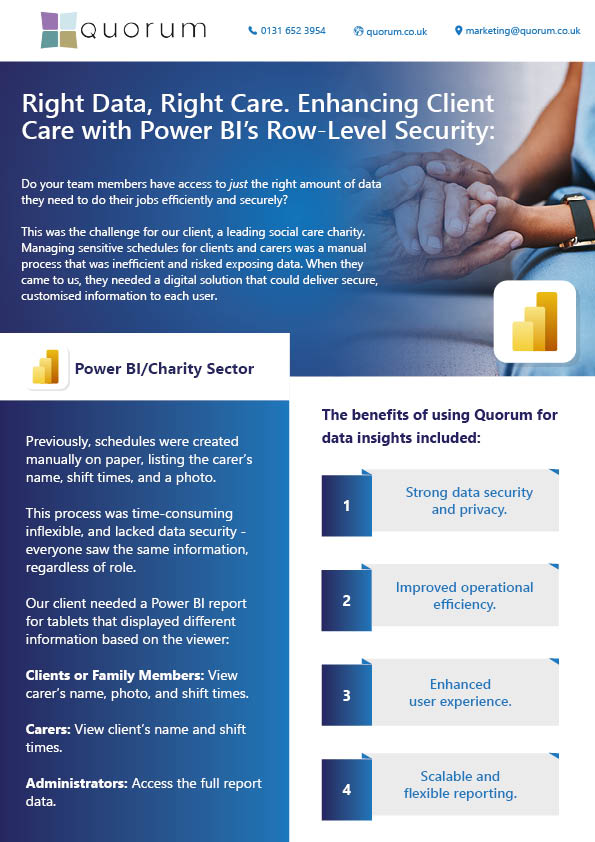
The report needed to display different information depending on who was viewing it:
-
Clients or Family Members: See the carer’s name, picture, and their scheduled arrival and departure times.
-
Carers: See the client’s name and the start and end times of their shifts.
-
Administrators: Certain users require access to view the data for the entire report.
The benefits of using Quorum for data insights included:
Strong data security
and privacy.
Improved operational efficiency.
Enhanced
user experience.
Scalable and
flexible reporting.
One typical approach is to build a separate report designed for each group or individual. That would mean we would have to create a report for Carers, the Family members (Clients) and also the administrators. As each group would require access to different sets of data. This approach presents challenges when requirements, or data, changes. Then all these separate reports must be updated to ensure consistency. That can mean much more work to maintain each report.
The Solution
We created a single report where all data was stored in a central location, allowing any changes to shift or details to be automatically updated once the data source was refreshed. The data source contains all details for carers, family members, administrators and shift information. We implemented a data structure to support Row-Level Security (RLS) in Power BI. RLS enabled us to determine, based on the user’s account (User Principal Name), what data they could see within the single report.
The steps included:
DATA STRUCTURE CONSOLIDATION
Built to support RLS, enabling specific data visibility based on user roles.
DYNAMIC DATA DISPLAY
Ensured that clients and family members could only see the relevant carers and shifts, while carers could only see the clients they were assigned to.
CENTRALISED DATA SOURCE
Held all carer and shift details, allowing for automatic updates and reflection of any changes.
USER MANAGEMENT
Allowed easy addition and removal of users from the data source, facilitating minimal ongoing maintenance.
When a user opens the report, RLS automatically filters the data to show only their specific information. The system uses the user’s email address (User Principal Name) to determine their access level, seamlessly filtering the data they can view and interact with through the Power BI service. This streamlined approach delivers all functionality through a single report. Administrator accounts have been specially configured to provide complete data visibility, enabling supervisors and managers to maintain comprehensive oversight whilst using the same unified report.
Benefits
Using Row-Level Security (RLS) in Power BI, we delivered a secure and dynamic reporting solution that:
- Ensures data security by limiting access to authorised information only.
- Eliminates the need for multiple reports and manual updates.
- Provides real-time updates across all user views.
- Reduces administrative overhead and maintenance costs.
- Offers customised access levels for different user groups.
- Simplifies system management through centralised control.
Conclusion
Managing who sees what within your organisation’s reports shouldn’t be complicated or time-consuming. This case study shows how a single, secure Power BI solution can replace multiple reports while maintaining precise control over data access.
Quorum specialises in creating tailored Power BI solutions that adapt to your specific business needs. Our expertise helps organisations move away from complex, manual reporting systems to streamlined, secure solutions that save time and reduce costs.
Contact us today to discover how we can transform your reporting capabilities with Power BI.
Learn More
Supporting Call Centre Teams with Smarter Reporting in Power BI
Power BI: Report Sharing Simplified Part Two
Power BI: Report Sharing Simplified
Database, Data Lake, Data Warehouse… What’s the Difference?
AWARDS & RECOGNITION

FOLLOW US
CONTACT INFO
CONTACT INFO
Quorum
18 Greenside Lane Edinburgh
UK EH1 3AH
Phone: +44 131 652 3954
Email: marketing@quorum.co.uk
FOLLOW US
AWARDS & RECOGNITION