
Fabric simplified: understanding Data Factory

One place for your data. Two simpler ways to connect it.
In our previous article, we looked at OneLake, Fabric’s single, unified data lake. It provides one place to store and manage data across the organisation, helping break down the silos that often develop between teams and technologies.
But storage is only part of the story.
Data still needs to be brought into the platform, cleaned, transformed and prepared before it can support reporting, analytics or AI initiatives.
That’s where Data Factory comes in.
Data Factory is Fabric’s workload for data ingestion and transformation. It brings together familiar capabilities for moving, preparing and managing data, while reducing much of the complexity that traditionally comes with building data pipelines.
Rather than stitching together multiple services and layers of orchestration, many common data integration tasks can be handled within Fabric itself.
While capabilities such as pipelines and notebooks are widely available across cloud data platforms, Microsoft Fabric also includes several native features designed to simplify data movement, transformation, and optimisation. Let’s look at three of these Fabric-native features: Copy Jobs, Dataflow Gen2 and Materialised Lake Views.
Getting data in with Copy Jobs
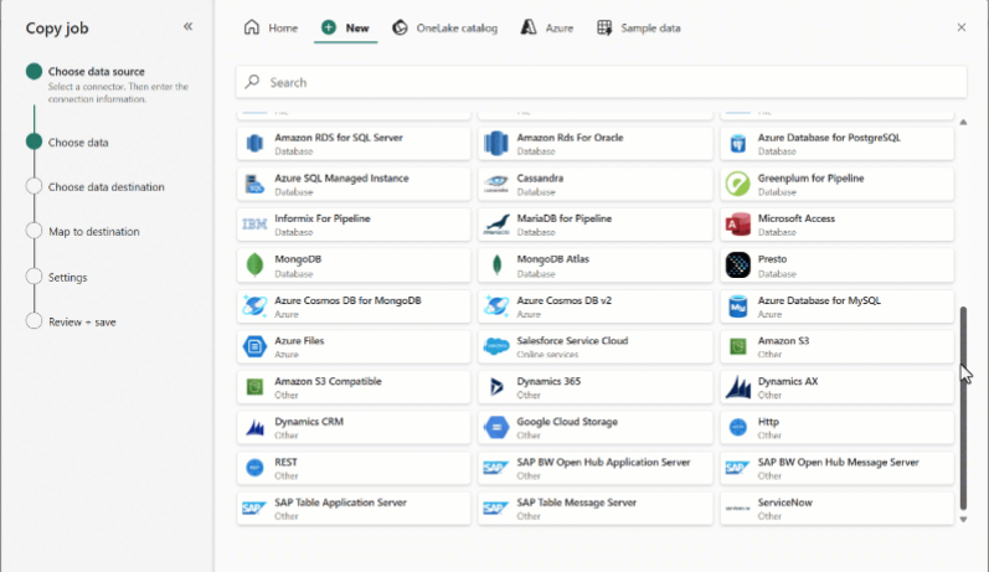
Copy Jobs provide a simple way to move data into Fabric without building a full pipeline.
If you’ve used Azure Data Factory before, think of them as a lightweight alternative to a traditional Copy Activity.
Copy Jobs can be configured directly from a Fabric workspace. Simply select a source and destination, then choose whether data should be copied in full or incrementally. Incremental copies are particularly useful when only new or changed records need to be brought into Fabric.
Copy Jobs focus solely on moving data. They’re not designed for transformation logic, so they won’t replace notebooks, SQL scripts or Dataflows. Instead, they provide a quick and practical way to land data in a Lakehouse and get it ready for the next stage of processing.
For straightforward ingestion scenarios, they can often be implemented and scheduled in minutes without writing code, reducing the effort involved in moving and managing data.
Preparing and transforming data with Dataflows Gen2
Once data has been ingested, it often needs some cleaning before it can be trusted and reused.
If you’re familiar with Gen 1, Dataflows Gen 2 is essentially the same – a low/no-code approach to cleansing and shaping your data. The main difference is enhanced compute and the ability to set destinations for your transformed data.
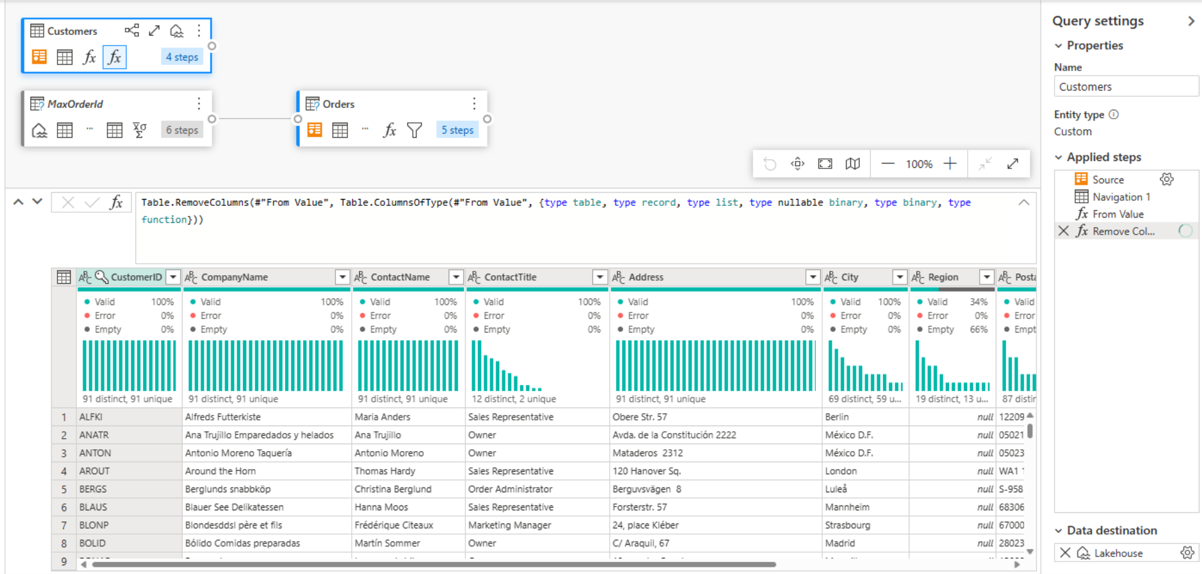
Built on the familiar Power Query interface, users can create step-based transformations quickly using a visual experience, rather than writing Spark or SQL.
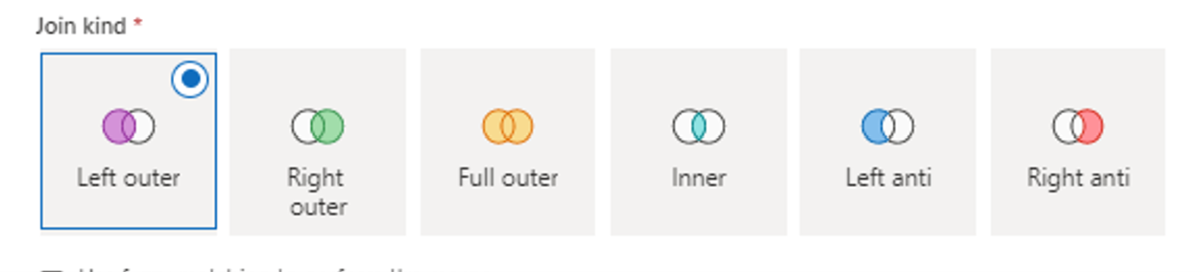
Common tasks include:
- Filtering unwanted records
- Standardising formats
- Joining datasets
- Aggregating data
- Applying business rules
Dataflow Gen2 supports a wide range of data sources, including Lakehouses, APIs, CRMs and more.
Compared to the original version of Dataflows, Gen2 introduces improved compute capabilities and allows transformed data to be written directly to a destination.
In many data architectures, Dataflow Gen2 helps move data from a raw state to an enriched state by applying data quality, transformation, and standardisation logic. It’s a good fit when you want rapid development and clear, transparent transformation logic that both technical and business users can understand.
Creating business-ready datasets with Materialised Lake Views
Materialised Lake Views (MLV) are one of the newer additions to Fabric and help simplify the process of creating reusable, business-ready datasets.
An MLV is created using Spark SQL and stored as a physical Delta table within the Lakehouse. Unlike a standard view, the results are persisted, which can improve performance and reduce the need for repeated processing.
Where MLVs become particularly valuable is in the additional functionality Fabric provides around them.
Once an MLV has been defined, Fabric can automatically track dependencies between datasets, making it easier to understand how information flows through the platform. That lineage can then drive refresh policies, data quality reporting, and the creation of new MLVs.
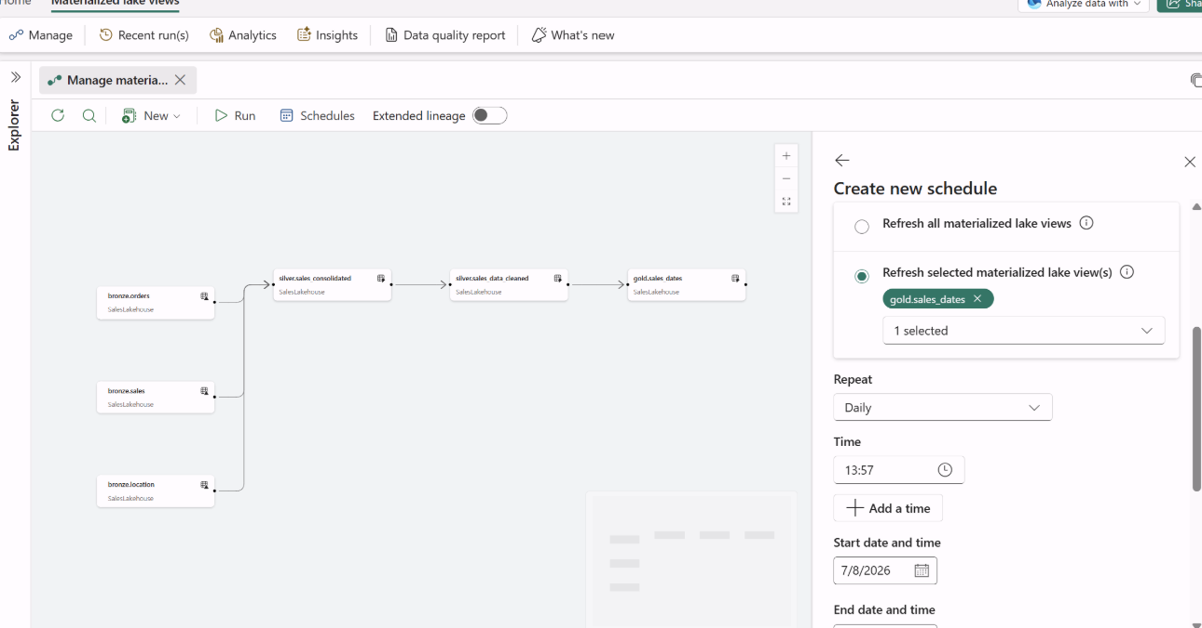
For supported scenarios, Optimal Refresh allows Fabric to determine whether a refresh should be skipped, run incrementally or perform a full reload based on changes in the source data.
They’re especially well-suited to structured BAU reporting environments and medallion-style architectures, where data moves through predictable stages before being consumed by analytics tools, as opposed to real-time or streaming data.
Overall, the result is simpler data pipelines with less code, fewer artifacts, and simpler orchestration.
How they work together
A common Fabric pattern looks something like this:
- As explored in our OneLake article, shortcuts and mirroring can provide the raw Bronze layer, while Copy Jobs can bring data into this layer when physical data movement is required.
- From there, Dataflow Gen2 can cleanse, standardise and merge the data to create trusted Silver datasets, using a low-code Power Query experience.
- Materialised Lake Views can then apply SQL-based business logic to create an optimised Gold layer for reporting, semantic models and downstream analytics.
The end result is a streamlined path from source data to insight, using fewer tools and less orchestration than many traditional data platforms require.
Key takeaways
Together, Copy Jobs, Dataflow Gen2 and Materialised Lake Views provide a straightforward path from source systems into OneLake and onwards to reporting and analytics.
Data Factory isn’t trying to replace every existing approach to data engineering. There will always be scenarios where complex pipelines, custom code and specialist tools are the right choice.
What Fabric does offer is a simpler way to handle many common data integration patterns, by reducing the number of tools and orchestration layers involved.
For organisations looking to reduce complexity without sacrificing capability, Data Factory offers a practical way to move from raw data to reliable insight with fewer moving parts to manage.
Why Quorum
Technology is only part of the challenge, and usually the easy part. Understanding how people, processes and data fit together is where most of the real work happens.
Some organisations come to Fabric because they’re supporting multiple reporting platforms. Others are struggling with duplicated datasets and inconsistent governance. Some simply want a clearer, more sustainable approach to managing data.
At Quorum, we help organisations understand where they are today, identify opportunities to simplify their data landscape, and build practical roadmaps for adopting Microsoft Fabric. That means looking beyond the technology itself, but also focusing on governance, architecture, reporting requirements and business outcomes.
The goal isn’t to deploy Fabric for the sake of it. It’s to create a data foundation that people trust, understand and actually use.
AWARDS & RECOGNITION

FOLLOW US
CONTACT INFO
CONTACT INFO
Quorum
18 Greenside Lane Edinburgh
UK EH1 3AH
Phone: +44 131 652 3954
Email: marketing@quorum.co.uk
FOLLOW US
AWARDS & RECOGNITION